
In the Player controls:
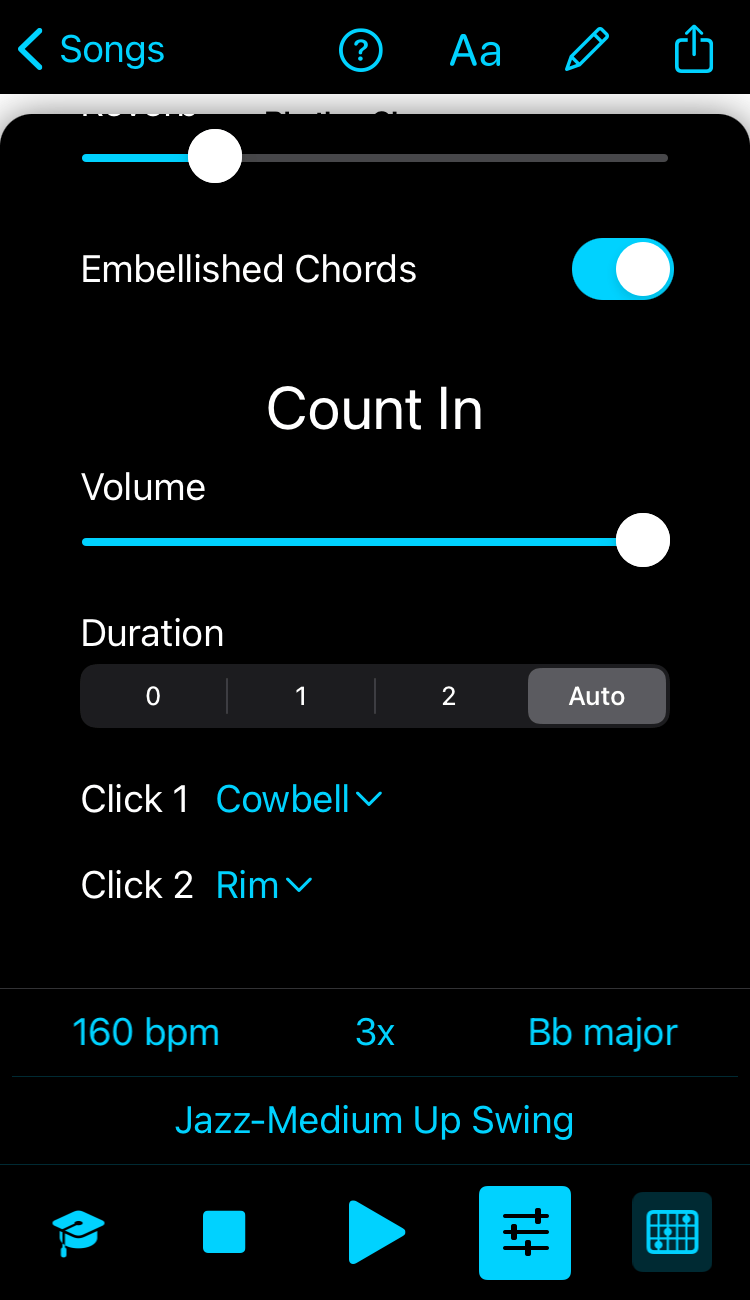
iOS, Android: tap on the Mixer button (second one from the right at the bottom of the screen) to change the Count-in settings. (In case you can't see the count-in when you open the mixer, scroll down to reveal it.)
Mac: the Player controls is the right panel. (View menu>Maximise/Minimise Player controls).
Windows: in the Player controls in the right panel (View > Toggle Player controls if it is minimized at the bottom).
You might need to scroll up to see the count in area in the window.
Select Zero for No count-in; Set the volume of the count in with the slider.
The Auto setting will automatically play one or two measures - depending on the tempo allowing more time for faster tempos before it starts playing.
You can also change the instrument sound of each click.
Keynote
New in v2025.2 (and in Windows)
Select "Keynote" in Click 1 to sound the root of the key of the song for the count in (useful for singers to pitch from.)
For example, a song in the key of D, the note D will be heard instead of clicks.

TIP: if you want a tuning note, for example an A to play as reference:
- create a song in A;
- add 1 bar of chord A5 (for example);
- Select Jazz - Long notes (optional);
- Set tempo to 40;
- Count in set to 2 bars;
- Count in Click 1 to Keynote
Play